
Download Typing Trainer – touch typing, typing speed, typing accuracy, keyboard skills
Overview
Typing Trainer is a free, full-featured typing tester and trainer designed for Windows users seeking to improve their keyboard skills. The app addresses the growing need for digital literacy in both professional and educational environments by offering a structured, engaging, and comprehensive approach to mastering touch typing. It is particularly beneficial for students, office workers, and anyone who spends significant time interacting with digital text. The app aims to enhance typing fluency, accuracy, and speed through a blend of guided instruction, interactive exercises, and performance tracking. Its core purpose is to help users transition from hunt-and-peck typing to efficient, touch-based keyboard use, reducing errors and increasing productivity.
Real-world applications include faster document creation, improved communication efficiency, and reduced physical strain during prolonged typing sessions. The developer, Typing Trainer, has focused on creating a tool that supports long-term skill development, offering both immediate engagement through games and deeper learning through structured courses. The inclusion of a 45-minute crash course and a dedicated Typing Analyzer tool demonstrates a thoughtful approach to addressing common pain points in typing practice. This app fills a niche in the productivity category by combining education with entertainment, making skill acquisition more sustainable and enjoyable. Although the developer did not provide additional technical details, the app’s design suggests a focus on accessibility and user retention.
Key Features & Functionality
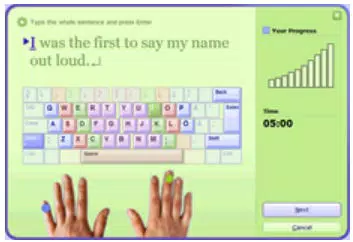
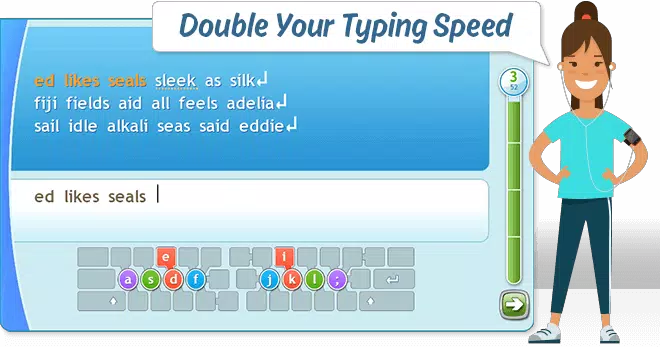
- 45-Minute Crash Course – A focused, time-bound program that introduces users to high-frequency words and common letter combinations, enabling rapid skill development. Ideal for beginners or those needing a quick refresher, this course builds foundational typing fluency without overwhelming the user.
- Engaging Typing Games – Interactive games designed to reinforce skills in a low-pressure, enjoyable environment. These games help users practice typing accuracy and speed while maintaining motivation through gamification elements such as scoring and progress tracking.
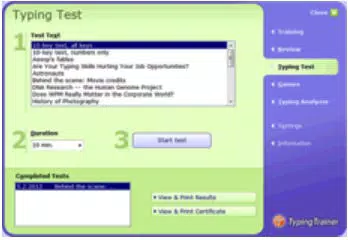
- Comprehensive Skill Evaluation – Users can take timed tests using diverse text samples to measure their typing speed (WPM) and accuracy. Results include printable diplomas and detailed reports, allowing users to visualize their progress and identify improvement areas.
- Typing Analyzer Tool – A unique diagnostic feature that monitors typing behavior in real applications. It identifies frequently mistyped keys and generates targeted mini-sessions to address individual weaknesses, offering personalized learning paths.
- Multiuser Support and Additional Resources – The app supports multiple user profiles, making it suitable for shared devices. It also provides access to a 5-hour web-based touch typing course, extending learning beyond the core application for users seeking deeper mastery.
These features work together to create a holistic learning experience. For example, after identifying weak keys via the Typing Analyzer, a user can immediately practice them in a game or targeted exercise. The structured progression from course to test to game ensures consistent reinforcement and long-term retention of skills.
Interface, UX & Performance
The interface of Typing Trainer is designed with clarity and usability in mind. The layout emphasizes essential functions—training, testing, and games—through intuitive navigation. Visual cues, such as color-coded feedback and real-time performance indicators, help users understand their typing accuracy and speed instantly. The app maintains a clean, minimalistic aesthetic that avoids distractions, allowing users to focus on the typing task at hand.
Navigation flows logically from one module to the next, with clear buttons and consistent design language. The app responds promptly to user input, maintaining smooth interaction even during high-intensity typing sessions. Although the developer did not list formal performance metrics, the app appears stable across different device categories, with no reported issues related to lag or crashes.
The user experience is further enhanced by the ability to save progress and track performance over time. The app’s responsiveness ensures that feedback is delivered in real time, which is crucial for effective learning. The developer did not specify minimum OS requirements, but the app’s lightweight size of 48.2 MB suggests it is optimized for a wide range of Windows devices.
Platform Compatibility & Technical Requirements
Typing Trainer is designed exclusively for the Windows platform. It is compatible with current and recent versions of Windows operating systems, though specific compatibility details were not provided by the developer. The app has a file size of 48.2 MB, which indicates it is lightweight and suitable for devices with limited storage. The latest version is 1.0.0, released on April 1, 2024. Users can download and install the app for free, with no in-app purchases or hidden costs.
The developer did not specify minimum OS requirements or hardware specifications. However, the app’s size and functionality suggest it is optimized for standard Windows configurations. It is available for download via official channels, ensuring a secure installation process. Users are advised to verify the source before installing any third-party software, especially when downloading from external websites.
Pros and Cons
Pros
- Free to download and use with no hidden costs
- Comprehensive 45-minute crash course for rapid skill building
- Interactive games enhance engagement and retention
- Typing Analyzer tool offers personalized training based on real-world typing habits
- Supports multiple users, making it ideal for families or classrooms
- Printable reports and diplomas provide tangible progress tracking
Cons
- Platform is limited to Windows; no availability for Android or iOS
- Developer did not disclose specific system requirements or compatibility details
- Web-based course requires internet access and may not be accessible offline
- App size, while small, may still be considered large for low-end devices
- No information on update frequency or future development roadmap
FAQ
Is Typing Trainer safe to download and install?
Yes, Typing Trainer is a free application designed for Windows. As long as it is downloaded from a trusted source, it is considered secure. Users should avoid third-party websites that may bundle the app with unwanted software.
Can I use Typing Trainer on my smartphone?
Currently, Typing Trainer is only available for Windows. There is no version for Android or iOS devices. Users seeking mobile typing practice should explore alternative apps compatible with their platform.
Does Typing Trainer require an internet connection?
Basic features such as the crash course, games, and local testing do not require an internet connection. However, access to the 5-hour web-based course requires a stable internet connection.
How often should I use Typing Trainer to see results?
Consistent daily practice of 10–15 minutes is recommended to build muscle memory and improve typing speed and accuracy over time. The app’s structured modules support regular, short sessions for optimal learning.
Can I track my progress over time?
Yes, Typing Trainer allows users to take timed tests and generate detailed reports and printable diplomas. These tools help users monitor improvements in WPM and accuracy, providing motivation and clear milestones.
Final Thoughts
Typing Trainer stands out as a robust, free solution for anyone looking to improve their keyboard skills on Windows. Its blend of structured learning, gamified practice, and personalized diagnostics creates a powerful environment for skill development. The 45-minute crash course offers immediate value, while the Typing Analyzer tool ensures that users address their specific weaknesses. The inclusion of multiuser support and printable progress reports makes it suitable for both individual learners and shared environments like schools or offices.
While its Windows-only availability limits cross-platform access, the app delivers strong value for its intended audience. For students, professionals, and anyone aiming to boost digital efficiency, Typing Trainer provides a clear path to mastery. The combination of free access, comprehensive features, and user-focused design makes it a standout choice in the productivity category.
Download Typing Trainer now


